

You run a busy café, salon, dental clinic, or retail shop. That is why we built AI Studio, the AI slide maker inside InfoSlides' digital signage for small business. Designing a promotion slide means finding a laptop, opening presentation software, picking fonts, resizing images, and finding time you simply do not have.
Most small business owners end up writing on chalkboards, taping paper signs to counters, or letting screens show outdated information. That is why we built AI Studio inside InfoSlides. It turns everyday inputs (a quick phone photo, a spoken voice message, or a pasted web link) into broadcast-ready screen slides in under a minute.

Three ways to create slides without design software
You do not need graphic design experience or special software skills. AI Studio works directly with the information you already have.
1. Snap a photo of what you already have
Did you write today's lunch specials on a chalkboard? Did a supplier hand you a printed promotional flyer? Just open InfoSlides on your phone, snap a photo, and upload it to AI Studio. The system extracts the items, descriptions, and prices, formats them cleanly, and applies high-contrast typography designed for TV viewing from across the room.
2. Speak a quick voice note
When you are on your feet, typing on a phone keyboard is slow. With voice input, you tap the microphone and speak naturally:
"Create a slide announcing 20% off all hair conditioning treatments this Thursday between 2 PM and 5 PM, with a note to book at reception."
AI Studio structures the headline, the promotional terms, and the call to action automatically.
3. Paste a link or upload a document
If you have an event page, a newsletter announcement, or a PDF menu from Canva, paste the URL or drop the file into AI Studio. It extracts the key points and generates a clean layout ready for your screens.
Built specifically for screens, not computer monitors
A slide that looks great on a laptop screen often fails on a TV. If the text is too small, people standing three meters away cannot read it. If the colors lack contrast, bright shop lights wash it out.
AI Studio handles the screen formatting rules for you:
- Legibility first: Headings, body copy, and prices are automatically sized and spaced for distance viewing.
- Your brand style: Slides use your brand colors and tenant logo automatically, keeping every screen consistent.
- Smart reading duration: Instead of setting a flat timer, InfoSlides calculates how long the slide should stay on screen based on the word count (typically 5 seconds plus time to comfortably read the text).
- Landscape or portrait support: Whether your TV is mounted horizontally on a wall or vertically in a shop window, AI Studio formats the layout for the screen's exact aspect ratio.
The "Needs Details" safety net
Generic AI tools often invent missing facts when they are unsure. If you ask for a promotion slide but forget to mention the price or date, regular AI might guess a number. On a public business screen, an invented price is a real problem.
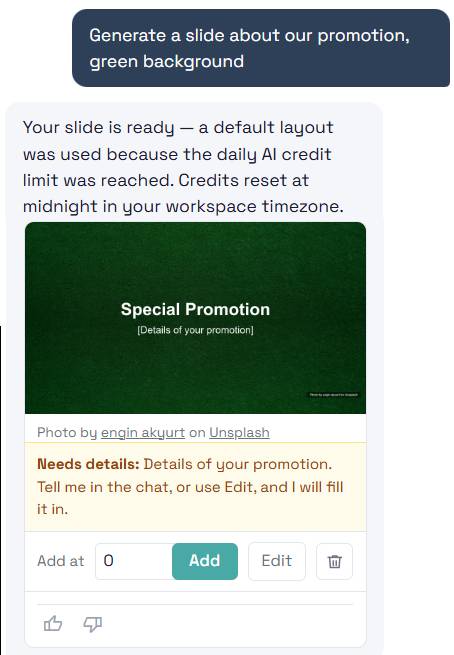
AI Studio includes a strict accuracy guard. If essential information is missing, it inserts a clear placeholder like [Price] or [Hours] and marks the slide with a amber Needs details tag. You see exactly what needs your input before anything goes live on your TV.
Part of hardware-free digital signage
AI Studio is built directly into InfoSlides. As detailed in our guide to digital signage for small business, InfoSlides requires zero proprietary hardware or media player boxes. Any smart TV with a web browser connects in seconds with a 6-character pairing code.
You can create a slide on your phone while walking between tables, preview it, tap add, and see it appear on your screen immediately.
Try it for free
Every InfoSlides workspace includes our permanent free plan covering one screen indefinitely. To let you see AI Studio in action, every free workspace includes a free trial: generate up to 3 slides with AI Studio in 7 days, and broadcast them to your screen, no credit card required.
When you need unlimited AI generation, the Starter plan (€9 per month on annual billing) unlocks AI Studio across all your slideshows.
Pair your smart TV and generate your first slide in just few minutes.