
Let an AI Agent Set Up Your Screens
InfoSlides can be set up and run by an AI agent: point Claude, Claude Code, Gemini CLI, Antigravity or Cursor at the InfoSlides MCP server and it can create the workspace, upload the deck, register the display, assign a schedule and return the stream link. The same workflow is available as a command-line tool and as a REST API.
Free to install · Works with your existing InfoSlides account
You Do Not Have to Be a Developer to Use This
If you already have an AI assistant open, the fastest way to get a screen live is to ask it. Everything the dashboard can do is exposed to the agent as a tool call.
One Command to Connect
infoslides mcp install --client claude-code writes the config for you. Claude Desktop and Cursor are one flag away. From then on, the agent has InfoSlides available.
Zero to a Live Screen
Workspace creation is an anonymous tool call that returns an admin key, so an agent can take you from nothing to a playing stream in one conversation, no account set up in advance.
The Backend Still Decides
Plan limits, device allowances and feature entitlements are enforced server-side. An agent cannot talk its way past them, and a leaked key cannot do more than the plan permits.
What that sounds like
Ask in Plain Language, Get a Running Screen
“Set up a lobby screen for Acme Café in portrait, put our lunch menu deck on it, and add a weather slide.” The agent provisions the workspace, uploads the deck, registers a 1080×1920 display, wires the weather source, assigns the schedule and returns the pairing code and the HLS link.
Later: “Hide the patio menu when it’s raining.” That is a visibility condition, and it is a tool call too. The screen starts behaving that way from the next render, with nothing to redeploy.
workspaces · slideshows · media · slide templates · visibility conditions · live data pushes · devices · schedules · stream links · slide previews · API keys · upgrade links
Works With Gemini and Antigravity
Run your screens from Google’s Gemini with an extension in the terminal, which works for any account, or, where Google offers it, as a custom app in the Gemini app.
Gemini CLI and Antigravity
Install the infoslides program, then add the extension. Antigravity also needs its own agy program, which you install first. The extension brings the full tool set and the Digital Signage Assistant skill.
gemini extensions install https://github.com/arnibj/InfoSlides.MCP
For Antigravity: git clone https://github.com/arnibj/InfoSlides.MCP, then agy plugin install ./InfoSlides.MCP.
The Gemini App
In the Gemini web app on a computer, add InfoSlides as a custom app under Settings, Connected Apps, with the address https://infoslides.app/mcp, then sign in with your InfoSlides account. It then also works in the mobile app. Google currently limits custom apps to adult personal accounts in the United States, in English, so the option may not appear for you. Photos and decks go in by web address, since the app cannot read files on your computer.
You Stay in Control
Requests run with your own sign-in, so the assistant can do what your role allows and no more. Most changes can be undone for 24 hours. Do not assume a client asks first: Antigravity hid a slide as soon as it was asked, so say “ask me first” if you want that. Disconnect under Connected apps in your InfoSlides settings, or remove the extension.
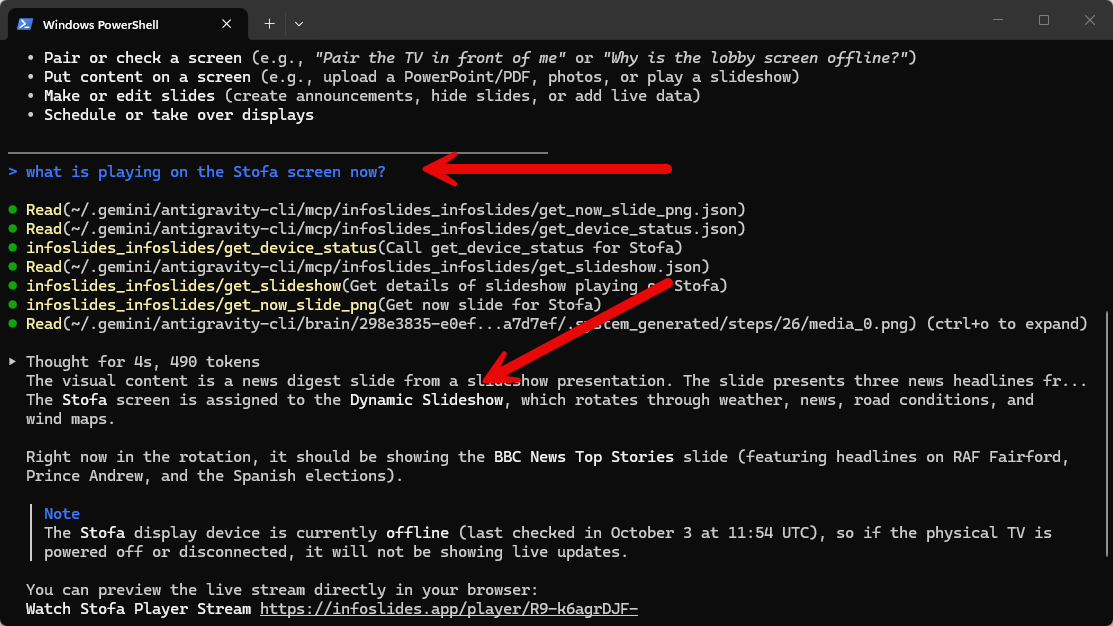
Step by step: run digital signage from Gemini and Antigravity
Works With Visual Studio Code
Add the hosted server to VS Code and ask about your screens from GitHub Copilot’s agent mode.
Add the Server
- Open the command palette (
Ctrl+Shift+P) and run MCP: Add Server. - Choose HTTP and enter
https://infoslides.app/mcp. - Name it
infoslidesand choose Global for every window or Workspace for this folder. - Run MCP: List Servers, choose
infoslidesand start it. Trust the server when VS Code asks. - Sign in and approve the connection on the InfoSlides page that opens.
You do not install a program or enter a key.
Then Ask
In Copilot Chat, switch to Agent mode and ask what is playing on a screen or to hide a slide. You get the everyday tools of the hosted server. Photos and decks go in by web address, because the hosted server cannot read files on your computer.
You Stay in Control
Requests run with your own sign-in, so the assistant can do what your role allows and no more. VS Code asks before it runs a tool, and most changes can be undone for 24 hours. Remove the server in VS Code and the connection under Connected apps in your InfoSlides settings to disconnect.
Or Drive It Yourself
One Native AOT binary, no runtime to install. It is the CLI by default and the MCP
server with --mcp. The same tools either way.
Command-Line Interface
Create workspaces, upload slideshows, register screens, assign schedules and read back stream links from your terminal. --json on any command makes the output machine-readable.
REST API & Webhooks
A documented HTTP API with an anonymous OpenAPI document at /v1/openapi.json. Push live values from your POS, inventory or booking system and the slide redraws.
Programmatic Show/Hide
Attach conditions to a slide: time of day, weekday, or a data value you push. Stock hits zero, the product slide stops playing. No one has to remember to do it.
Push Your Own Data
Data-provider API keys are push-only and scoped to a single source, so a build server or a shop-floor script can update one slide without holding credentials for the whole workspace.
Provision on Behalf of Customers
Workspace and user creation are API calls, so a reseller or platform can spin up an InfoSlides account per customer as part of its own onboarding.
Nothing Proprietary in the Way
Screens pair with a six-character code and play standard HLS. The CLI, the API and the stream format are all things you can point other tools at.
Getting Started
Download the binary for your platform, then pick a lane.
Install
Grab the archive for your platform from the releases page. Native AOT, so there is no runtime to install alongside it.
Connect or Sign In
infoslides mcp install to hand it to an agent, or infoslides login to authenticate the CLI in your browser.
Put Something on a Screen
Upload a deck, register a device, assign a schedule, then read back the stream link and open it on the TV.
A first session
From an Empty Account to a Playing Screen
infoslides login: OAuth in the browser
infoslides tenant create "Acme Cafe" <owner-email> --save
infoslides device create "Lobby screen" --width 1080 --height 1920
infoslides schedule assign <device-id> <slideshow-id>
infoslides stream link <device-id>
Credentials resolve in a fixed order: flags, then
INFOSLIDES_API_KEY and INFOSLIDES_API_URL, then
~/.infoslides/, so the same script runs on a laptop and in CI
without a code change.
infoslides <verb>. The CLI
infoslides --mcp: an MCP server over stdio
Technical details
- MCP server
- Hosted at https://infoslides.app/mcp, or run locally over stdio with the CLI's --mcp flag.
- CLI
- One free binary, Native AOT compiled, with no runtime or package manager needed. A --json mode is available for automation.
- REST API
- The OpenAPI document is published without authentication at /v1/openapi.json.
- Slideshow upload
- A .pptx or .pdf file up to 50 MB.
- Data push
- Data-provider keys are push-only and scoped to a single content source.
- Plan required
- Works on every plan, including free. Limits and feature entitlements are enforced by the backend.
CLI & MCP: Common Questions
Do I need to be a developer to use the InfoSlides MCP server?
No. If you already use Claude, Claude Code, Gemini CLI, Antigravity or Cursor, one install command connects InfoSlides to it and you then ask for what you want in plain language. The CLI is there for people who would rather type the commands themselves.
Is it safe to let an AI agent manage my InfoSlides screens?
The agent can only do what your plan allows: limits, device allowances and feature entitlements are enforced by the InfoSlides backend, not by the tool descriptions. Data-provider keys are push-only and scoped to a single content source, so a script that updates one slide cannot touch the rest of the workspace.
Which MCP clients work with InfoSlides?
Claude Code, Claude Desktop and Cursor have a one-command install. Gemini CLI installs the InfoSlides extension from GitHub, Antigravity installs it as a plugin from a cloned copy, and Visual Studio Code adds the hosted server at https://infoslides.app/mcp with the MCP: Add Server command. Any other MCP client works too, since the local server speaks stdio.
Can I use InfoSlides with Gemini or Antigravity?
Yes. Gemini CLI installs it with gemini extensions install https://github.com/arnibj/InfoSlides.MCP, and Antigravity installs it with agy plugin install on a cloned copy of that repository. The Gemini web app can also add the hosted server as a custom app, though Google currently limits custom apps to adult personal accounts in the United States, in English. The blog post at /blog/run-digital-signage-from-gemini-and-antigravity walks through both.
Can another system drive my InfoSlides screens without the CLI?
Yes. Everything the CLI does is a REST call, and the OpenAPI document is published at /v1/openapi.json without authentication. Push a value from your POS or inventory system and a slide can appear, change or hide in response.
Hand Your Screens to an Agent
Free to install, works with the account you already have, or with one the agent creates for you.
Download the CLI