
Digital Menu Board Software for the TV You Already Own
InfoSlides is digital menu board software that plays your menu on a smart TV or any browser display. You upload the menu you already have, choose which board plays at breakfast, lunch and dinner, and change prices from a browser.
Free plan · No credit card required
What a Menu Board Has to Do
Get the menu onto the screen, show the right one at the right hour, and keep prices current, for a restaurant, café, coffee shop, bakery, bar or canteen.
Start From the Menu You Have
Upload a PowerPoint or PDF, import a Google Slides deck, or have AI Studio build slides from a typed note, a photo of a printed menu or a spreadsheet. How PowerPoint decks render or the ways to get PowerPoint slides on a TV
Day Parts on a Schedule
Give each slide a time-of-day or day-of-week condition, so the breakfast board gives way to lunch and then dinner. Only the slides that fit the moment play. How to set up a digital menu board.
Prices Without a Walk to the Screen
Replace the file or edit a slide from any browser and every paired screen follows. A price held in your own system can be pushed in, so the slide changes when the number does. How live data refreshes or how a menu board updates by itself
A Bakery Menu That Follows the Time of Day
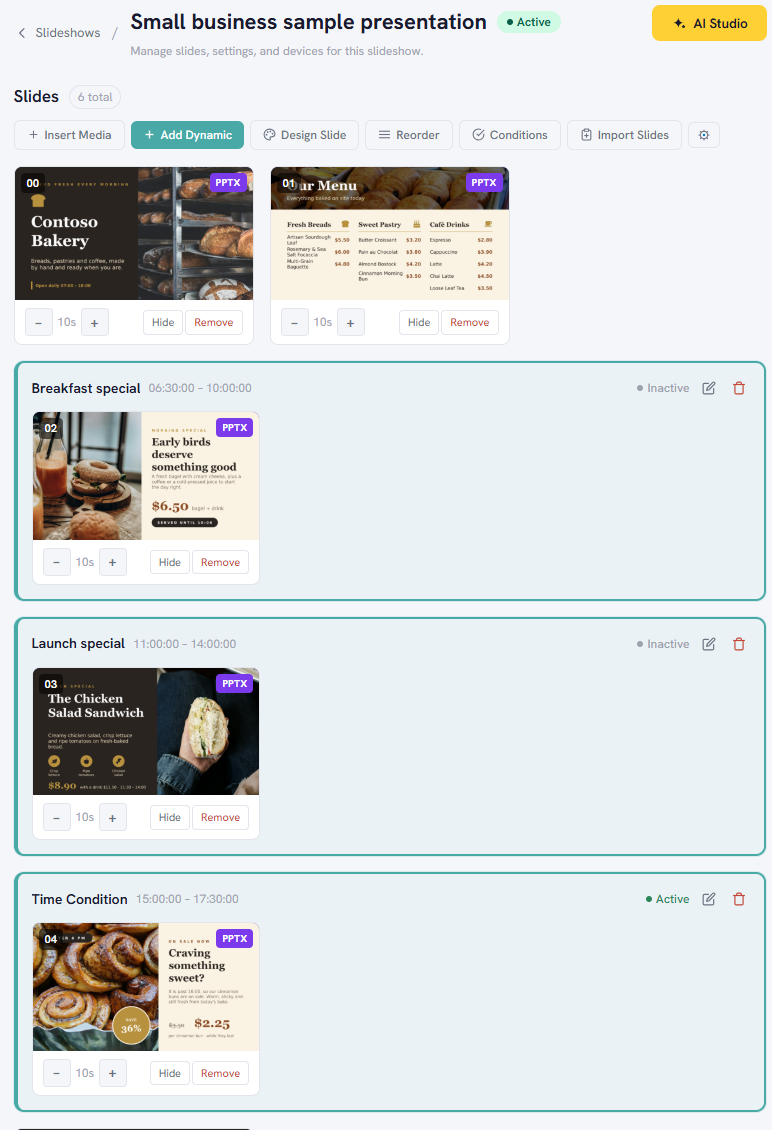
A finished sample for a bakery. The offer slides carry time conditions, so breakfast, lunch and afternoon offers each play at their own hours. It plays in a browser, and you can take a copy into your own workspace.
Slides that choose themselves
The three offer slides each have a time condition: breakfast, lunch and afternoon. Only the one that fits the time of day plays, and the rest stay out of the loop. The screenshot shows how the conditions are set on the slideshow page.
A Restaurant Menu That Follows the Day of the Week
A finished sample for a restaurant. Each dish of the day has a weekday condition, so only today's slide plays.
Slides that choose themselves
Each dish slide has a day-of-week condition, so only the slide for the dish of the day plays. On a Thursday the screen shows the Thursday dish, and on Friday it switches to the Friday dish. Nobody has to change the slideshow.
A Bar Menu With the Match on Screen
The menu board can sit next to a live scoreboard on the same screen set. This one shows scores for several matches at once, updating as the data arrives. It plays in a browser or in the latest Android app. How live playback works
Technical details
- Menu sources
- A .pptx or .pdf file up to 50 MB, a Google Slides import, or slides drafted in AI Studio from text, a photo of a printed menu or a CSV spreadsheet. AI Studio turns each spreadsheet row into one slide.
- Day parts
- Slides carry time-of-day and day-of-week conditions, evaluated in your workspace time zone unless a condition sets its own. Devices can also follow a schedule.
- Changing a price
- Replace the file or edit a slide from any browser. A price held in your own system can be pushed in through the API, and the slide redraws.
- Screens
- Any smart TV or browser display. Native apps for LG webOS and Android TV, and Samsung TVs pair through the built-in browser.
- Orientation
- Landscape, portrait and square outputs, from 720p to 1080p.
- Not carried over
- PowerPoint animations, transitions and embedded video or audio. Each slide is rendered as one still image.
- Plan required
- The free plan covers one screen, with a small "Powered by InfoSlides" watermark. Live-data slides and AI Studio are on Starter and higher plans.
Digital Menu Board Software: Common Questions
How do I use a TV as a digital menu board?
With InfoSlides you upload the menu you already have, open the pairing page in the TV's browser or use the LG webOS or Android TV app, enter the pairing code, and the menu plays. No media player box is needed, and the TV can switch menus by time of day.
Is there free digital menu board software?
Yes. The InfoSlides free plan covers one screen with no credit card, and streams carry a small "Powered by InfoSlides" watermark. Live-data slides, such as prices pushed from another system, and AI Studio are on paid plans.
Can I make a digital menu board in PowerPoint, Google Slides or Canva?
Yes. Design the menu in PowerPoint or Google Slides and upload the .pptx or PDF, or export a PDF from Canva and upload that. InfoSlides renders each slide as it is, so text and layout come through, while animations and transitions do not.
How do I update prices on a digital menu board without going to the screen?
With InfoSlides you change the price from any browser: edit the slide or replace the menu file, and every paired screen follows. If the price lives in another system, such as a POS or inventory tool, it can be pushed in through the InfoSlides API and the slide redraws when the number changes. Live-data slides are on Starter and higher plans.
Can a digital menu board switch between breakfast, lunch and dinner menus by itself?
Yes. InfoSlides slides carry time-of-day and day-of-week conditions, so only the slides that fit the moment play. The bakery sample on this page shows breakfast, lunch and afternoon offers taking turns on one screen, and the restaurant sample shows a different dish for each weekday.
Put Your Menu on a Screen
The free plan covers one screen and needs no credit card.
Get Started Free